
Check GMC Vehicle History by VIN
A GMC VIN check shows the vehicle history records before buying or selling a used GMC. Check for reported accidents, title brands, odometer records, theft records, and other details to make an informed decision.
What Is a GMC VIN Check?
A GMC VIN check uses the vehicle identification number to look for available history records tied to a GMC truck, SUV, or van. These may include reported accidents, title brands, mileage, theft, ownership, and other records.
When buying or selling a used GMC, the report can help you compare the vehicle's recorded history with the seller's description. Results depend on available data, so use the report alongside an inspection and supporting documents.
GMC VIN Check vs. GMC VIN Decoder
A GMC VIN decoder and VIN check use the same VIN but answer different questions. Use the decoder for basic vehicle details and the VIN check when you need available history records.
| Tool | What It Shows | Best For |
|---|---|---|
| GMC VIN Decoder | Year, model, engine, body style, and other decoded vehicle details | Confirming vehicle identity and specifications |
| GMC VIN Check | Reported accidents, title brands, mileage, ownership, theft, and other history records | Researching a used GMC before buying or selling |
← Scroll horizontally to see more →
What Records Are Shown in a GMC Vehicle History Report
A GMC VIN lookup can reveal several types of vehicle records that help buyers and sellers transact with confidence. Here’s what to expect:
Vehicle Specifications
Identify details such as the model year, make, model, body style, engine, and other vehicle information, depending on the available data.
Vehicle Usage
A vehicle history report shows whether a GMC was used as a rental, fleet vehicle, or commercial vehicle. These details can help explain its past use.
Accident and Damage History
A check reveals reported collisions, damage events, or insurance claims. Use these records to identify possible concerns before arranging a vehicle inspection.
Title Brands and Status
A GMC title check highlights salvage, rebuilt, flood, or other title brands. These records can help you spot vehicles with serious past damage or title issues.
Mileage Records
A GMC mileage check compares odometer readings recorded at different times. helping you point out possible odometer problems or data entry errors.
Ownership History
A GMC vehicle history report shows the number of previous owners and registration events, helping you understand the vehicle's background.
Theft Records
A GMC VIN search reveals any records of theft or whether a vehicle was listed as stolen. Be sure to contact the proper authorities if you suspect theft.
Lien and Loan Records
This shows whether a lender has a financial interest in a GMC. Confirm any outstanding loan or lien with the relevant authority before buying.
Service and Maintenance Records
Some reports may include oil changes, repairs, inspections, and more. These records can help you understand the vehicle's maintenance history.
Sales History
This shows previous listings, asking prices, sale dates, or auction activity. This helps you identify changes in how a GMC has been advertised.
Auction Records and Photos
A GMC vehicle history check may include auction listings, sale dates, damage notes, and photos. These records can help you compare the vehicle's past condition with its current appearance.
Recall Information
A GMC VIN lookup may identify available recall information. You can also enter the VIN on the GMC recall check page to check for certain unrepaired safety recalls.
What a GMC Vehicle History Report Will Not Show
A GMC vehicle history report can reveal useful records, but it cannot confirm every event or condition. Some details may never be reported or recorded.
Every Accident or Repair
Not every accident or repair is reported. Privately repaired damage or events missing from available databases may not appear in the report.
Current Mechanical Condition
A history report does not confirm whether the engine, transmission, brakes, or other components work properly today. Inspect the vehicle before buying.
Complete Ownership Details
Available records may not include every previous owner, registration change, or full ownership period. Coverage depends on reporting rules and data sources.
Undisclosed Problems
A VIN check cannot rule out hidden damage, flood exposure, odometer tampering, or other issues. Review the vehicle and supporting documents carefully.
How to Run a GMC VIN Check
You can complete a GMC VIN check in three simple steps. Start with the vehicle's VIN, review the basic details, and then access the available history records.
Enter the GMC VIN
Enter the GMC's 17-digit VIN in the form at the top of this page. You can also use a US license plate lookup if available.
Submit the Form
Submit the form to preview available vehicle specs, such as the year, make, model, and engine. Check that the results match the GMC you want to investigate.
Get the GMC Vehicle History Report
Pay to access the full report offered by our service, including records like accident, title, mileage, theft, ownership, and more.
Why Get a VIN Check Before Buying or Selling a Used GMC?
A GMC VIN check helps buyers make better choices and gives sellers useful information about a vehicle's background. It can support honest discussions and help both sides prepare for a sale.
Buyers
A GMC VIN check for used cars helps buyers look beyond the seller's description. Reviewing available records before paying can help you spot warning signs and ask better questions.
Spot Possible Hidden Problems
Review reported accidents, title brands, mileage changes, and other records. These details reveal concerns that deserve further checks before you agree to buy.
Make a Better Buying Decision
Use the report to compare the vehicle's recorded history with the seller's claims. If something does not match, ask for proof or arrange an independent inspection.
Avoid Unexpected Costs
Finding reported damage, title issues, or possible mileage problems early can help you avoid a costly mistake. Check repair needs and ownership documents before completing the purchase.
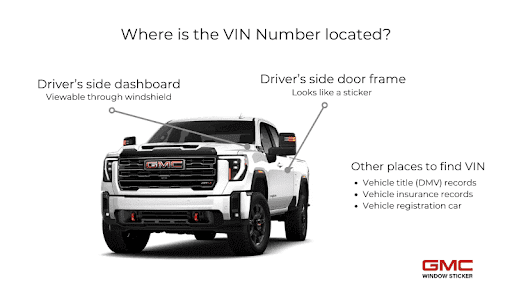
Where to Find the VIN on a GMC
You can find the GMC VIN in several places on the vehicle and its paperwork. Compare the number across available locations to make sure you enter it correctly.
- Dashboard: Look through the windshield at the lower driver's side of the dashboard. The VIN is often visible from outside the vehicle.
- Driver's side door jamb: Check the label or plate near the driver's door opening. It may show the VIN along with other vehicle details.
- Vehicle registration: Look for the VIN on your registration documents.
- Insurance documents: Your insurance card or policy paperwork may list the vehicle's VIN.
- Title document: Check the vehicle title for the identification number.
Why Choose Our GMC VIN Lookup Tool?
Our GMC VIN lookup tool helps you start your vehicle search in a few simple steps. Here’s why many buyers and sellers choose us:
Trusted Data Sources
We use available vehicle data to help you review reported history records with confidence.
Instant VIN Lookup
Enter the VIN and submit the form to begin your search. Available basic vehicle details can help you confirm that you entered the correct number.
Modern and Classic VIN Support
Look up modern GMC vehicles and pre-1981 older models. Older vehicles may use different VIN formats, so results depend on model year and available records.
24/7 Customer Support
Need help with your lookup? Our customer support team is available to assist with questions about the search and report process.
Which GMC Models Do We Support?
Our GMC VIN lookup supports a range of popular trucks, SUVs, and vans, including:
Related GMC VIN Lookup Tools
Need more than a vehicle history check? Explore these GMC lookup tools to find specific vehicle details and information:
Frequently Asked Questions About GMC VIN Check
How Do I Check a GMC VIN for Free?
You can check a GMC VIN for free by entering it into our VIN decoding tool. Basic results will show the model year, make, model, engine, transmission, body style, drive type, and more.
What Information Does a GMC VIN Check Provide?
A GMC VIN check provides vehicle details, such as reported accidents, title brands, mileage records, theft information, ownership changes, and recalls.
Can a GMC VIN Check Show Accident History?
Yes, a GMC VIN check may show reported accidents and damage events. However, not every incident appears in vehicle history databases, so an independent inspection is also important.
Can I Check a GMC VIN for Title Problems?
Yes, a GMC title check may reveal reported salvage, rebuilt, flood, or other title brands. Confirm the current title status with the relevant state motor vehicle agency before buying.
How Do I Check GMC Mileage by VIN?
To check GMC mileage by VIN, enter the VIN into our vehicle history lookup tool and retrieve recorded odometer readings. Compare them for inconsistencies that may need further investigation.
Can I Check an Older GMC VIN?
Yes, you can look up older GMC vehicles using our tool. Pre-1981 vehicles usually use shorter 5-14 digit VIN numbers that modern decoders cannot process.
Where Can I Check a GMC VIN for Recalls?
You can check a GMC VIN for recall records using our tool. However, for the current recall status, we recommend you use the NHTSA recall lookup. Enter the VIN to find certain unrepaired safety recalls associated with the vehicle.